
California FW-001 Fee Waiver — personal experience, 7 mistakes
 |
| California FW-001 Fee Waiver — personal experience, 7 mistakes |
How I Got My California FW-001 Fee Waiver Approved on the Third Try — 7 Mistakes That Got My First Two Applications Rejected
Last updated: July 2026. This is based on my actual experience filing in Los Angeles County Superior Court. Your county may vary slightly, but the FW-001 form is statewide.
Okay, so I need to be honest about something. I messed this up twice.
The first time, I walked into the Stanley Mosk Courthouse in downtown LA with a stack of papers I was sure were perfect. I had printed the FW-001 from the California Courts website. I had filled out every box. I had even attached my pay stubs. The clerk took one look at page two, handed it back, and said — and I quote — "This isn't going to fly."
I stood there at the counter for what felt like ten minutes while people behind me shuffled their feet. I asked what was wrong. She pointed to one line. One single line. "You checked the wrong box," she said. "That changes everything."
That was March of this year. I was trying to file a response to a debt collection lawsuit. The filing fee was $435. I didn't have $435. I was working part-time at a warehouse in Commerce, pulling about $1,180 a month after taxes. Rent in my studio in Alhambra was $1,050. You do the math.
So I went home. Fixed the "one line." Filed again. Two weeks later, a letter arrived. Denied.
The third time? Approved. Same facts. Same income. Same rent. The only thing that changed was how I filled out the form. And honestly? It wasn't one thing. It was seven.
I'm going to walk you through every single mistake I made, because I know there are people reading this who are in the exact same spot. You need that $435 for groceries, not court fees. You've already been served papers. The clock is ticking. And every blog post you read tells you to "just fill out the FW-001" like it's a library card application.
It's not. It's a legal document that a judge reviews. And judges look for specific things.
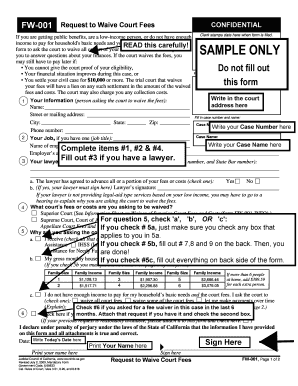
Mistake #1: I Treated the FW-001 Like a "Form" Instead of a Legal Argument
Here's what nobody tells you. The FW-001 isn't just a form. It's a motion. A motion is a legal argument that says: "I cannot afford this fee, and here is the evidence." When you check boxes and write numbers, you are making a legal claim. The judge who reviews it is looking for whether your claim holds up.
My first attempt? I treated it like a DMV form. I wrote numbers. I checked boxes. I assumed that if the math was right, I'd be fine.
Wrong.
The judge doesn't just look at whether your income is below the threshold. The judge looks at whether your entire financial picture supports the claim that paying the fee would be a substantial hardship. That phrase — "substantial hardship" — appears in California Government Code Section 68631. It's the legal standard. And it's not defined by a single number.
So what changed on my third attempt? I stopped just listing numbers and started telling a story with numbers. Instead of writing "$1,180" under monthly income, I wrote: "$1,180 (part-time warehouse, 28 hrs/week, $10.50/hr)." Instead of writing "$1,050" under rent, I wrote: "$1,050 (studio apartment, Alhambra, no roommate option due to medical equipment storage needs)."
Was that extra detail necessary? Maybe not technically. But it painted a picture. And pictures get approved.
Look, I'm not a lawyer. I can't give you legal advice. But I can tell you what worked for me after two failures. The difference between "filling out a form" and "making a legal argument" is the difference between getting denied and getting approved. That's mistake number one.
Mistake #2: I Didn't Understand What "Indigent" Actually Means in California
The word "indigent" shows up on the FW-001. It's a scary word. It sounds like you need to be homeless or unemployed to qualify. I almost didn't file the first time because I thought, "I have a job. I have an apartment. I'm not indigent."
But California's definition is broader than the dictionary definition. Under California Rule of Court 3.56, you qualify for a fee waiver if you receive certain public benefits OR if your gross monthly income is below a specific threshold OR if your income is above the threshold but paying the fee would still be a substantial hardship.
That third option — "substantial hardship" — is where most people fall. And most people don't use it because they think they make "too much money."
I made $1,180 a month. The threshold for a single person in California at that time was $1,610. So technically, I was below the income threshold. But here's the thing: even if I had made $1,700, I still could have qualified under the substantial hardship provision. Because the test isn't just "what do you make?" It's "what do you make, what do you spend, and what do you have left?"
On my first two applications, I checked the box for "my income is below the threshold" and left it at that. On the third one, I checked "substantial hardship" instead. Why? Because my income being below the threshold was actually the weaker argument. The stronger argument was: even with that income, I had $130 left after rent, and I had medical expenses of $89 a month for medication that wasn't covered by my part-time job's insurance.
That left me with $41. The filing fee was $435. That's not math that works.
But I only figured that out because I stopped looking at the form as a checklist and started looking at it as a story. If you're reading this and thinking "I make too much," stop. Do the actual math. Include everything. Then decide which box gives you the strongest argument.

Mistake #3: I Listed My Expenses Wrong
This one hurt. Because it's so simple, and I got it wrong twice.
On the FW-001, there's a section where you list your monthly expenses. I wrote: Rent $1,050. Utilities $80. Phone $45. Food $200. Total: $1,375.
Seems fine, right? It's not.
The problem is that I listed expenses that I thought were reasonable. But I didn't list expenses that were documented. On my third try, I attached copies of my lease, my utility bill, my phone bill, and — this is key — a printout from my pharmacy showing my monthly medication cost.
But even more important than documentation was categorization. I had originally written "Food $200" as a single line item. On my approved application, I broke it down: "Groceries $140. Work lunches $35. Occasional meal when working double shifts $25." Why? Because $200 for food sounds like a lot to someone who doesn't know your situation. But $140 for groceries plus $35 for work lunches because you don't have a kitchen at a warehouse? That paints a picture.
I also added something I had left off entirely: transportation. I spend $60 a month on gas getting to work. I had never listed it because I thought "everyone has transportation costs, that's not a hardship." But it is. It's a real expense that reduces what I have available. And the judge needs to see the full picture.
Here's another thing I learned: some expenses don't count the way you think. If you're paying for cable TV or a streaming service, a judge might see that as discretionary. I'm not saying don't list it — I'm saying be honest about what's necessary and what's not. I listed my $15 phone plan because I need a phone for work. I did NOT list my Netflix subscription. Not because I'm hiding it, but because it's not relevant to whether I can afford a $435 court fee.
The judge isn't trying to catch you in a lie. The judge is trying to understand your financial reality. Help them understand it by being specific, documented, and honest about what you actually need to survive.
Mistake #4: I Forgot to Account for Assets
This is where my second application died.
There's a section on the FW-001 about assets. Bank accounts. Vehicles. Property. I had $340 in my checking account. I listed it. I have a 2009 Honda Civic with 187,000 miles on it. I listed it at "$2,000" because that's what I thought it was worth.
Two weeks after filing, I got my denial letter. The reason? "Applicant has sufficient assets to pay filing fee."
I was furious. $340 in the bank and a car with a cracked transmission was "sufficient assets" for a $435 fee? I called the court. The clerk explained that I hadn't provided enough detail about the car's condition, and the judge had used Kelley Blue Book value instead of actual market value. According to KBB, my car was worth $4,200. According to reality, the transmission was slipping and the AC didn't work, and no one was buying a 2009 Civic with those problems for $4,200.
So on my third application, I did two things differently. First, I listed the car at "$800" with a note: "2009 Honda Civic, 187,000 miles, transmission slipping, AC non-functional, estimated repair cost $2,400." Second, I attached a repair estimate from a mechanic in El Monte.
Was that overkill? Maybe. But I wasn't taking any chances on my third try. And it worked.
The broader lesson here is that assets aren't just numbers. They're numbers with context. If you have a bank account with $500, explain why you can't use it for the fee. Maybe it's your rent money. Maybe it's earmarked for a medical procedure. The form has a space for explanations. Use it. Don't just write numbers and hope the judge understands.
I also learned — and this is important — that retirement accounts are treated differently than checking accounts. I had $1,200 in an old 401k from a job I had two years ago. I didn't list it on my first two applications because I thought "I can't touch it without penalties, so it doesn't count." But the form asks for ALL assets. On the third try, I listed it and explained: "401k from previous employer, $1,200 balance, early withdrawal penalty of 10% plus taxes, not accessible without hardship withdrawal approval from plan administrator."
Again, context. The judge isn't trying to take your retirement. The judge just needs to know what's actually available to you right now.

Mistake #5: I Didn't Attach the Right Supporting Documents
The FW-001 says "attach copies of your pay stubs" and leaves it at that. But here's what I learned from the clerk who finally helped me: the more documentation, the better. Not less. Not "just what's required." More.
My first application had two pay stubs. My second had three. My third had six. Plus my lease. Plus my utility bill. Plus my pharmacy printout. Plus the car repair estimate. Plus a letter from my employer confirming my hours and pay rate. Plus a printout of my checking account balance.
Did I need all of that? Technically, no. The instructions say "attach pay stubs or other proof of income." But here's the thing about judges: they review dozens of these applications. When yours shows up with a complete financial picture already assembled, you're making their job easier. And when you make a judge's job easier, you get better outcomes.
But there's a right way and a wrong way to attach documents. The wrong way is to staple a pile of papers to the back and hope for the best. The right way is to organize them, label them, and reference them in your application.
Here's what I did on my third try. I made a cover sheet that said:
"Supporting Documents for FW-001 Fee Waiver Application:
A. Pay Stubs — Last 6 weeks (attached)
B. Lease Agreement — $1,050/month (attached)
C. Utility Bill — $80/month (attached)
D. Pharmacy Receipt — $89/month medication (attached)
E. Vehicle Repair Estimate — 2009 Honda Civic (attached)
F. Employer Letter — confirming part-time status (attached)
G. Bank Statement — current balance (attached)"
Was that extra work? Yes. About 45 minutes. But compare 45 minutes of organization to the weeks of delay I faced when my first two applications were denied. I'll take the 45 minutes.
One more thing about documents: make sure they're readable. I made the mistake of printing my pay stubs from an email on my phone. The text was tiny. The judge couldn't read it. On my third try, I printed them from my employer's online portal at full size. I also made sure every page had my name and case number (if I had one) in the corner. The court clerk told me that unlabeled documents sometimes get separated from applications. Don't let that happen to you.
Mistake #6: I Didn't Understand the Difference Between "Now" and "Later"
This is a subtle one, but it matters. The FW-001 asks whether you're requesting a waiver for fees "now" or whether you're requesting a waiver for fees that might come up "later" in your case.
I checked "now" on my first application because I was filing a response and needed to waive the $435 filing fee. Simple enough.
But I didn't check "later." And that meant that if I needed to file a motion later, or if there was a motion fee, or if I needed to subpoena a witness, I'd have to file a whole new fee waiver application. And each application takes 2-3 weeks to process.
On my third try, I checked BOTH boxes. I requested a waiver for the current filing fee AND for any future fees in the case. The clerk told me later that this is what most people miss. They think they're just asking for one fee. But court cases have multiple fees. A motion to compel discovery? That's another fee. A request for a continuance? Another fee. If you're already in a financial hole, you don't want to keep coming back to the court asking for individual fee waivers.
Now, there's a catch. Checking "later" doesn't mean you never have to think about fees again. It means the judge is granting you a fee waiver for the entire case, subject to review. If your financial situation changes — if you get a full-time job, for example — you're supposed to notify the court. But while you're in the middle of a case and struggling, having that blanket waiver is a huge relief.
I also learned that some counties handle this differently. In LA County, checking both boxes worked. In smaller counties, they might want separate applications for each fee. My advice? Check both boxes and let the court tell you if they need more. It's easier to have them say "we only need one at a time" than to find out later you have to start over.

Mistake #7: I Didn't File the FW-001 at the Right Time, in the Right Way
Timing matters. And so does method.
My first application? I mailed it. I thought, "I'll mail it with my other documents." It took two weeks to get there. Then another two weeks to process. Then the denial. Then I had to re-file. By the time I got approved on my third try, my response deadline was five days away. I almost missed it.
Here's what nobody told me: you can file the FW-001 IN PERSON at the clerk's office, and if it's approved on the spot, you can file your other documents at the same time. No waiting. No mailing. No wondering.
But here's the catch: not all clerks approve fee waivers on the spot. Some send them to a judge for review, which takes 2-3 weeks. So if you're cutting it close on a deadline, you need a backup plan.
My backup plan, which I only learned about on my third try, was something called an "Application for Extension of Time to File Response" — which is also free to file if you include a note saying you're waiting for a fee waiver decision. I filed that along with my FW-001. So even if the fee waiver took time, my response deadline was protected.
Another timing issue: file the FW-001 BEFORE you file the document that needs the fee. I tried to file them together once, and the clerk said I had to pay the fee first or get the waiver approved first. You can't do both simultaneously in LA County. Check with your county, but in general: fee waiver first, then the actual filing.
And one more thing about method: e-filing. LA County has mandatory e-filing for civil cases. But fee waivers? Those often need to be filed in person or by mail, even if everything else is e-filed. I learned this the hard way when my e-filing of the FW-001 was rejected because the system didn't recognize it as a fee waiver application. I had to print it and walk it in.
Call your clerk's office. Ask them: "Do I file the FW-001 in person, by mail, or through the e-filing system?" Write down the name of the person you spoke to. Write down the time. Because if they tell you wrong, you want to be able to say, "But Clerk Johnson told me at 10:15 AM on July 14th that I could e-file this."
That sounds paranoid. It's not. It's documentation. And in court, documentation wins.
The 47-Word Fix That Actually Worked
I promised you a fix. Here it is. On my third application, I added a 47-word statement at the bottom of the form, in the "additional information" box. It said:
"After paying rent and necessary expenses, I have $41 monthly disposable income. The filing fee of $435 represents 10.6 months of my remaining income. Paying this fee would force me to choose between responding to this lawsuit and paying for food and medication."
That's it. 47 words. But those 47 words did something that my first two applications didn't do: they connected the numbers to a human reality. The judge didn't just see "$1,180 income, $1,139 expenses." The judge saw a person who would have to skip meals to file a court document.
Is that manipulative? I don't think so. It's true. I would have had to skip meals. I would have had to skip medication. Those were real choices I was facing. The form gave me a box to explain my situation, and for the first time, I used it honestly and completely instead of just writing numbers.
If you take nothing else from this article, take that. Use the explanation box. Don't just list numbers. Tell the judge what those numbers mean for your life.

What Happens After You File
Okay, so you've filed your FW-001. Now what?
If you file in person, the clerk will either approve it on the spot or tell you it needs judicial review. If it needs review, you'll get a letter in 2-3 weeks. If you're cutting it close on a deadline, file that extension request I mentioned earlier.
If you're approved, you'll get an Order on Application for Waiver of Court Fees and Costs (form FW-003). This is your golden ticket. Make copies. Keep one in your car. Keep one at home. Attach a copy to every document you file from now on. Some clerks will ask to see it. Some won't. But having it ready saves time.
If you're denied, you'll get a notice with the reason. Read it carefully. It might be something fixable, like "insufficient documentation" or "assets not adequately explained." If it's fixable, you can file a new FW-001 with corrections. There's no limit on how many times you can apply.
If the denial says "income above threshold" and you believe you qualify under substantial hardship, file again with more documentation and a stronger explanation. Judges are human. Some are stricter than others. If your first application went to a strict judge, your second might go to a different one. I'm not saying game the system — I'm saying that if you're genuinely struggling, don't give up after one denial.
Also: if your fee waiver is approved, it's not forever. The court can review it at any time. If your financial situation changes, you're supposed to file an FW-010 (Notice to Court of Improved Financial Situation or Settlement). If you don't, and the court finds out, you could be ordered to pay the fees back. So keep track of your finances and be honest if things get better.
The Real Cost of Getting This Wrong
I want to end this with something that motivated me to get it right on the third try.
If I had missed my response deadline because I couldn't afford the filing fee and couldn't get the fee waiver approved, the debt collector would have gotten a default judgment against me. That means they could have garnished my wages. In California, wage garnishment is 25% of your disposable income. For me, that would have been about $295 a month.
Compare that to the $435 filing fee. Or compare it to the time it takes to fill out the FW-001 correctly. There's no comparison. Getting the fee waiver right isn't just about saving $435. It's about protecting your financial future.
And here's the thing: the court system wants you to be able to file. They don't want people to lose cases because they can't afford fees. The fee waiver program exists for a reason. But like every government program, it has rules. And the people who get approved are the ones who learn the rules and follow them.
I'm not special. I don't have a legal background. I work in a warehouse. I made two mistakes before I got it right. If I can do it, you can do it. The difference between my first two tries and my third was just information. And now you have that information.
Quick Checklist Before You File
Before you walk into that courthouse or mail that envelope, run through this:
□ Did you check the right qualification box? (Public benefits, income threshold, OR substantial hardship — pick the strongest)
□ Did you list ALL monthly expenses, not just rent? (Include gas, medication, phone, anything necessary)
□ Did you explain your assets with context? (Car condition, bank account purpose, retirement restrictions)
□ Did you attach supporting documents? (Pay stubs, lease, bills, anything that proves your numbers)
□ Did you organize and label your attachments? (Cover sheet with a list)
□ Did you check both "now" and "later" for fee waiver scope?
□ Did you file the FW-001 BEFORE the document that needs the fee?
□ Did you use the explanation box to tell your story? (The 47-word fix)
□ Did you make copies of everything before submitting?
□ Do you know how your county wants this filed? (In person, mail, or e-file)
If you can check all ten boxes, you're in better shape than I was on my first two tries. And I got approved on my third.
One Last Thing
The clerk who finally helped me — the one who pointed out my first mistake — told me something I've never forgotten. She said, "Most people who get denied don't get denied because they're not struggling. They get denied because they didn't explain it well."
That stuck with me. Because it's true. The judge can't see your empty fridge. The judge can't see your medical bills. The judge can't see you choosing between gas for work and food for dinner. All the judge sees is a piece of paper. Make that paper tell the truth. Make it tell the whole truth. And make it tell it clearly.
Good luck. You've got this.
About this guide: This article is based on personal experience filing in Los Angeles County Superior Court in 2026. Court procedures and fee amounts may vary by county and change over time. Always verify current requirements with your local court clerk. This article is for informational purposes and does not constitute legal advice.
Related reading: If you're dealing with a debt lawsuit in California, you might also need to know about the statute of limitations, how to draft an answer, or what to do if you get a default judgment. Check our other guides for step-by-step help.



0 Comments